Campaign Settings Panel
The Campaign Settings panel is used to define settings for Quick Campaigns, including the maximum number of leads that can be included in a quick campaign and which quick campaigns display on the Sales Campaign screen. In addition, this panel is used to define settings for automatically sending leads for quick campaigns to FOCUS in the Digital Retail Platform.

|
The Campaign Settings panel displays on the General Settings screen. To access the General Settings screen, click the |
 (More) icon and then click the General Settings link in the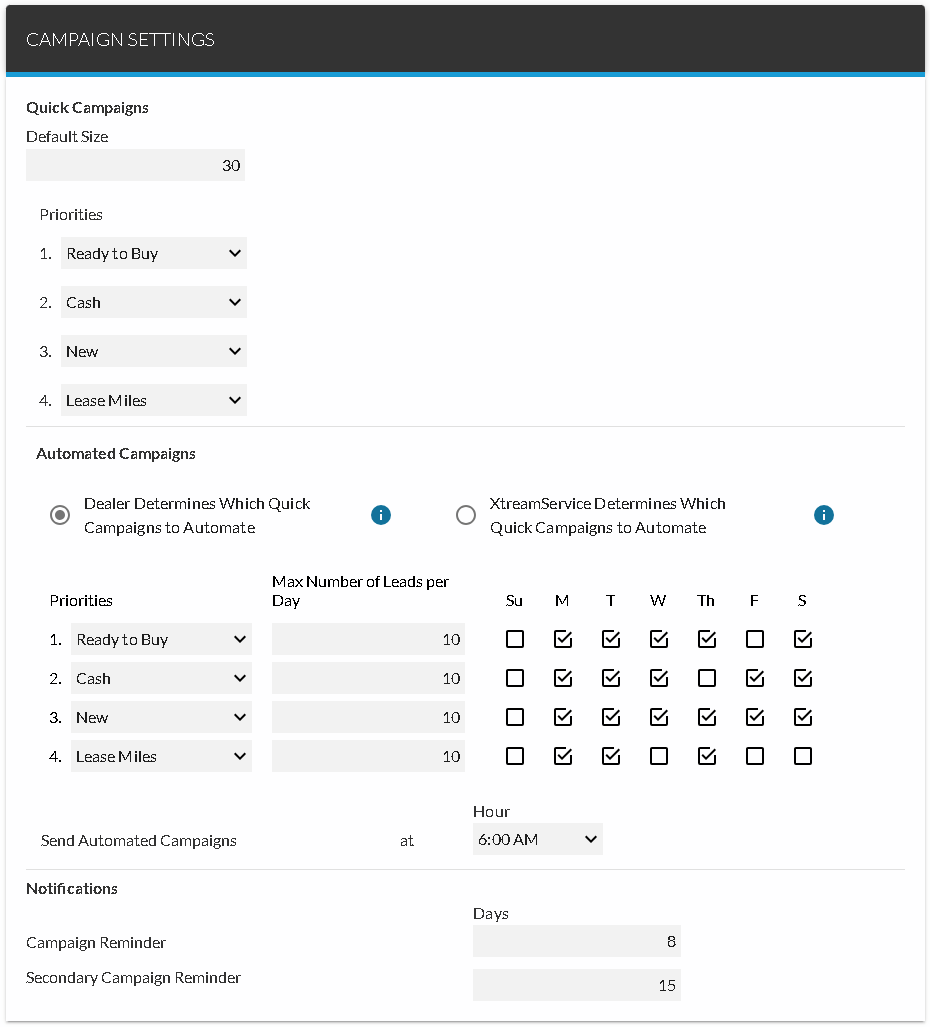
 Quick Campaigns Section
The Quick Campaigns section is used to define the maximum number of leads that can be included in Quick Campaigns and which quick campaigns display on the Sales Campaign screen.
The following fields are available in the Quick Campaigns section.
Default Size: Enter the maximum number of leads to include in Quick Campaigns. If the number of leads added to a quick campaign exceeds the entry in this field, a message window displays, informing the user that the maximum number of leads has been exceeded and asking if the leads should still be sent. If the user sends the leads, only the highest rated leads, up to the maximum number, are sent.
Priorities: Select a campaign to determine the order in which quick campaigns display on the Sales Campaign screen. For example, select a campaign in the 1 field to display the campaign first on the Sales Campaign screen. Click the  (Down Arrow) icon to display a list of valid entries.
Automated Campaigns Section
The Automated Campaigns section is used to define settings for automatically sending leads for Quick Campaigns to FOCUS. Select an option button in this section to indicate the quick campaigns for which leads should be automatically sent.
The following fields are available in the Automated Campaigns section.
Dealer Determines Which Quick Campaigns to Automate: Select this option button to automatically send leads for certain Quick Campaigns each day to FOCUS.
The following columns are available when the Dealer Determines Which Quick Campaigns to Automate option button is selected.
Priorities: Select a quick campaign for which to send leads each day. Click the (Down Arrow) icon to display a list of valid entries.
Max Number of Leads per Day: Enter the maximum number of leads to generate for the quick campaign each day.
Business Days: Select check boxes corresponding to the days on which each quick campaign should be automatically sent.
XtreamService Determines Which Quick Campaigns to Automate: Select this option button to automatically send leads to FOCUS for selected quick campaigns on a rotating basis.
The following fields are available when the XtreamService Determines Which Quick Campaigns to Automate option button is selected.
Total Number of Leads per Day: Enter the maximum number of leads to generate each day from automated quick campaigns.
Quick Campaigns Selected: Select the quick campaigns to automatically send leads to on a rotating basis. Click the (Down Arrow) icon to display a list of valid entries.
Business Days: Select check boxes corresponding to the days on which leads for quick campaigns should be automatically sent.
Hour: Select the time of day to automatically send leads for Quick Campaigns to FOCUS. Click the (Down Arrow) icon to display a list of valid entries.
Note - Leads can only be sent between 5:00 a.m. and 8:00 p.m. Eastern time.
Notifications Section
The Notifications section is used to define the number of days after which campaign alerts are sent.
The following fields are available in the Notifications section.
Campaign Reminder: Enter the number of days after which an alert is generated if a sales campaign has not been started. If a sales campaign has not been started in the entered number of days, an alert message displays on the Alerts window.
Secondary Campaign Reminder: Enter the number of days after which a secondary alert is generated if a sales campaign has not been started. If a sales campaign has not been started in the entered number of days, an alert message displays on the Alerts window.
Note - The entry in this field must be larger than the entry in the Campaign Reminder field.
Click here for a list of products that may be mentioned in this help file.